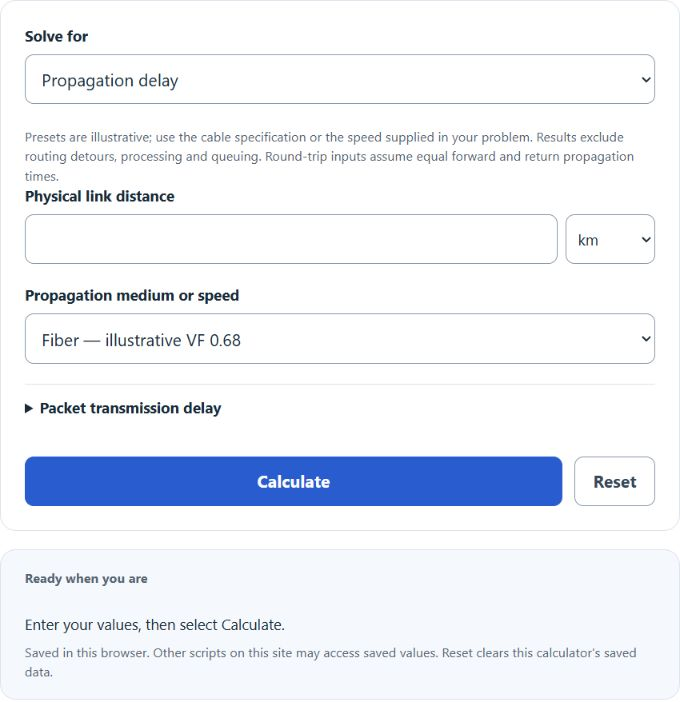
Calculate network propagation delay from link distance and medium, plus RTT, transmission delay, bandwidth-delay product, and max distance for a latency budget.
Network Propagation Delay Formula
T_prop = D / (VF * c)
RTT_prop = 2 * T_prop ; T_trans = L / R ; one-way product = R * T_prop ; RTT-based BDP = R * RTT
Variables:
- T_prop is the one-way propagation delay in seconds
- D is the physical length of the link in meters
- VF is the velocity factor of the medium, the fraction of light speed at which the signal travels (0 to 1)
- c is the speed of light in a vacuum, 299,792,458 m/s
- RTT is the round-trip propagation delay, the theoretical floor for a ping time
- T_trans is the transmission delay, the time to push all bits of one packet onto the link
- L is the packet size in bits and R is the link rate in bits per second
- The one-way product is the link rate times one-way propagation delay. RTT-based BDP, commonly used for TCP window sizing, is bottleneck rate times end-to-end RTT. The calculator also shows a propagation-only round-trip estimate.
The default mode applies the first formula directly: enter a distance, pick a medium, and the calculator multiplies the velocity factor by c to get the propagation speed, then divides distance by that speed. It reports the one-way delay, the round trip, and the delay per kilometer. The max distance mode rearranges the formula to D = T_prop * VF * c, so you enter a delay budget (one-way or round-trip) and get the farthest a link can reach within it. The propagation speed mode rearranges to VF * c = D / T_prop, which turns a distance and a measured delay into the implied speed and velocity factor without identifying the medium from a latency measurement. The advanced fields in the default mode add the second set of formulas: packet size and link rate produce the transmission delay, the total one-way delay, and the bandwidth-delay product.
Propagation Speed by Medium and Delay Over Common Routes
The velocity factor is set by the physics of the medium, not by the quality of your internet plan. Radio waves in air move at essentially full light speed, while light in glass fiber and electrical signals in copper move at roughly two-thirds of it. The first table gives illustrative values used by the calculator, plus their resulting delay per kilometer. Actual cable velocity factors vary by product; use the manufacturer specification or the speed provided in the problem.
| Medium | Velocity factor | Speed (m/s) | One-way delay per km | Per 100 km |
|---|---|---|---|---|
| Wireless, radio, free space | 1.00 | 3.00 x 10^8 | 3.34 µs | 0.33 ms |
| Coaxial cable, foam dielectric | 0.83 | 2.49 x 10^8 | 4.02 µs | 0.40 ms |
| Optical fiber (single-mode) | 0.68 | 2.04 x 10^8 | 4.90 µs | 0.49 ms |
| Coaxial cable, solid polyethylene | 0.66 | 1.98 x 10^8 | 5.05 µs | 0.51 ms |
| Twisted pair, Cat5e/Cat6 | 0.65 | 1.95 x 10^8 | 5.13 µs | 0.51 ms |
| Textbook convention | 0.67 | 2.00 x 10^8 | 5.00 µs | 0.50 ms |
The second table illustrates propagation estimates using the assumed fiber rate of 4.90 microseconds per kilometer (free-space speed for the satellite examples). The RTT ranges are illustrative scenarios, not verified current measurements or service guarantees. Real routing, cable specifications, processing, serialization and queuing affect latency; this comparison cannot establish path efficiency.
| Route | Great-circle distance | Theoretical one-way (fiber) | Theoretical RTT | Illustrative RTT scenario |
|---|---|---|---|---|
| New York to Los Angeles | 3,944 km | 19.3 ms | 38.7 ms | 60 to 70 ms |
| New York to London | 5,585 km | 27.4 ms | 54.8 ms | 68 to 78 ms |
| San Francisco to Tokyo | 8,280 km | 40.6 ms | 81.2 ms | 100 to 120 ms |
| London to Singapore | 10,885 km | 53.4 ms | 106.8 ms | 160 to 180 ms |
| GEO satellite hop (radio, 35,786 km up and down) | 71,572 km path | 238.7 ms | 477.5 ms | 500 to 600 ms |
| LEO satellite hop (radio, about 550 km altitude) | 1,100 km path | 3.7 ms | 7.3 ms | 25 to 40 ms |
Example Problems
Example 1: One-way delay and RTT from New York to London over fiber.
The great-circle distance is 5,585 km and single-mode fiber has a velocity factor of 0.68. The propagation speed is 0.68 * 299,792,458 = 2.039 x 10^8 m/s. The one-way delay is T_prop = 5,585,000 / 2.039 x 10^8 = 0.0274 s, or 27.4 ms, and the round trip is 54.8 ms. A hypothetical 70 ms ping is about 15 ms above this assumed propagation estimate. That difference alone does not establish cable-route efficiency.
Example 2: Total one-way delay for a packet, using the advanced fields.
A 1,500-byte packet crosses a 200 km fiber link at 100 Mbps. The transmission delay is T_trans = 12,000 bits / 100,000,000 bps = 120 microseconds. The propagation delay is T_prop = 200,000 / 2.039 x 10^8 = 981 microseconds. The total one-way delay is 120 + 981 = 1,101 microseconds, or about 1.1 ms. The one-way propagation product is approximately 100,000,000 * 0.000981 = 98,100 bits, or 12.3 decimal kB. A symmetric propagation-only RTT gives twice that product; a TCP RTT-based BDP should use the actual end-to-end RTT.
Frequently Asked Questions
Why is my measured ping higher than the calculated propagation delay?
The calculator estimates signal travel time using the entered physical path and assumed speed. A measured ping also includes route detours, processing, queuing and packet serialization; forward and return routes can differ. There is no universal percentage threshold here for declaring a route efficient.
What propagation speed should I use for a homework problem?
Use the speed stated in the problem. Presets include 2.0 x 10^8 m/s and 2.5 x 10^8 m/s; a custom speed is also available. The fiber and copper options are illustrative assumptions rather than universal material constants. The free-space option uses the exact vacuum speed of light as an idealized radio-path model.
Does a faster internet plan reduce propagation delay?
No. Bandwidth sets the transmission delay, the time to push bits onto the link, but it does nothing to the time those bits need to travel the distance. Upgrading from 100 Mbps to 1 Gbps cuts the transmission delay of a 1,500-byte packet from 120 microseconds to 12, yet a New York to London round trip keeps its roughly 55 ms propagation floor. That is why latency-sensitive services put servers physically closer to users with CDNs and edge nodes instead of simply buying faster links.