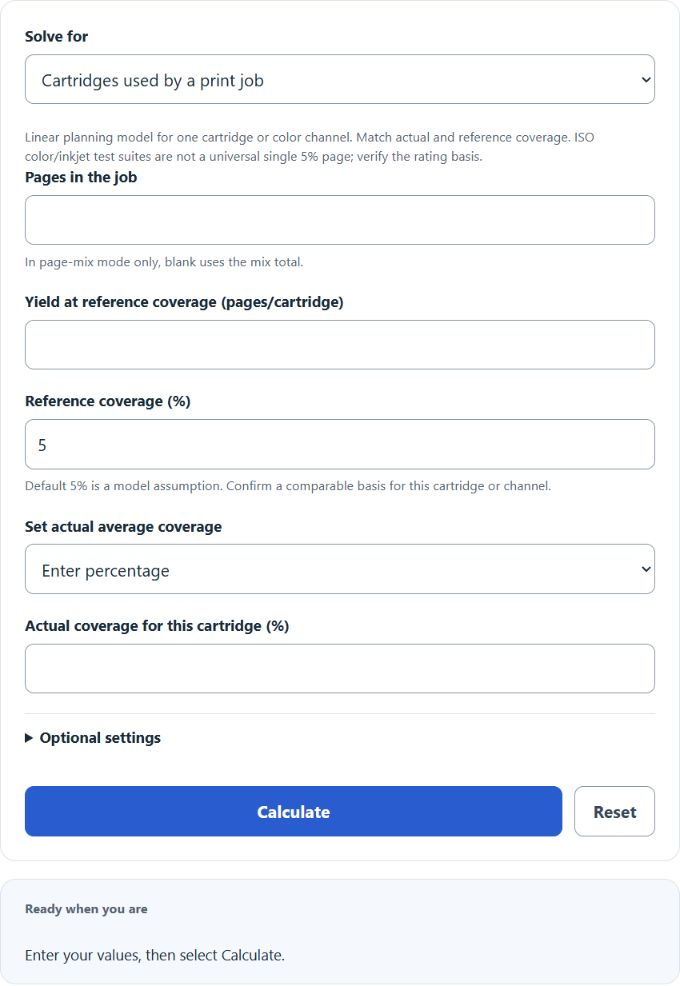
Calculate ink usage in cartridges from pages printed, average page coverage, and cartridge yield, plus pages left and run-out date from your current ink level.
Related Calculators
- Label Size Calculator
- Flag Size Calculator
- Fabric Shrinkage Calculator
- Tattoo Tip Calculator
- All Everyday Life and Education Calculators
Ink Usage Formula
The calculator is a linear planning model for one cartridge or color channel. Enter a reference yield and a comparable reference coverage; the default 5% is an explicit assumption. ISO color toner and inkjet ratings use mixed-content test suites, not a universal single 5% page. Do not compare summed CMYK coverage with a single-channel baseline. The formulas below show the special case of 5% reference coverage and zero extra allowance.
Variable Definitions
| Variable | Meaning | Unit |
|---|---|---|
| IU | Estimated ink usage | cartridges |
| NP | Number of pages printed | pages |
| PC | Average page coverage | percent |
| CY | Cartridge yield at 5% coverage | pages per cartridge |
How the Formula Works
For this model, usage = pages × actual coverage ÷ (reference yield × reference coverage) × (1 + extra allowance/100). The allowance is additive to net consumption, not a fraction lost from supplied ink. Inverse modes use the same relationship. Capacity rounds down to complete pages; purchasing rounds up. Actual yield also depends on printer, maintenance, test documents and print settings. See HP’s ISO inkjet yield methodology and Lexmark’s monochrome and color yield explanation.
This means:
- If page coverage doubles, estimated ink usage roughly doubles.
- If cartridge yield doubles, required cartridges are cut roughly in half.
- If page count increases, ink usage increases in direct proportion.
Rearranged Forms
Because the calculator can solve for any missing variable, these rearranged versions are helpful when you know the other three inputs:
How to Use the Calculator
- Enter the page coverage percentage as a whole percent value. For example, enter 5 for 5%.
- Enter the total number of pages printed.
- Enter the cartridge yield in pages per cartridge at 5% coverage.
- The calculator returns the estimated ink usage in cartridges.
Interpreting the Result
- A result below one means the job uses only part of a cartridge.
- A result near one means the job is close to a full cartridge.
- A result above one means multiple cartridges should be planned for.
- For purchasing, round the result up to the next whole cartridge.
Here, Q is the number of cartridges to buy for the job.
Estimating Average Page Coverage
Page coverage is the percentage of each page that receives ink. Since most print jobs contain a mix of text, graphics, logos, and photos, using an average coverage estimate is often the most practical approach.
In this expression, Pi is the number of pages in a section of the job, and Ci is the coverage percentage for that section.
The following ranges and the calculator presets are illustrative assumptions, not measured document coverage:
- 3% to 7% — light text pages, memos, invoices
- 5% to 10% — typical office printing with headers or small graphics
- 10% to 20% — reports with charts, colored headings, and moderate images
- 20% to 40% — flyers, handouts, and graphic-heavy pages
- 40% to 100% — photo pages or dense full-page artwork
Example
If a job contains 1,000 pages at 5% coverage and the cartridge is rated for 200 pages at 5% coverage, the estimated ink usage is:
The job would use approximately 5 cartridges.
Planning Tips
- If your result is close to a whole cartridge, keep a spare cartridge available to avoid print interruptions.
- Use separate estimates for black-only jobs and color-heavy jobs when coverage differs significantly.
- For long print runs, estimate by batch so changes in layout or image density do not distort the average.
- If your printer performs frequent cleaning cycles, real consumption may be slightly higher than the formula estimate.
Common Mistakes to Avoid
- Entering 0.05 instead of 5 for a 5% page coverage value.
- Using a cartridge yield from a different printer or print mode.
- Ignoring heavy graphics, photos, or full-color backgrounds when estimating coverage.
- Forgetting to round up when ordering cartridges for a real print job.
Frequently Asked Questions
Can this calculator be used for toner as well as ink?
Yes. The same logic can be used whenever cartridge yield is expressed in pages at 5% coverage.
Why is my real usage different from the estimate?
The formula is a planning model. Actual consumption can vary with print quality settings, printer maintenance cycles, image density, and the way coverage is distributed on each page.
What if my document contains different page types?
Use the weighted page-mix mode or a measured average for the same cartridge/channel. Blank job pages in mix mode use the mix total. In pages-left mode, the approximate forecast uses the entered ink gauge, constant printing rate, 30.44 days per modeled month and the saved start date. Blank or zero rate omits dates. The reorder threshold is 15% remaining. Reset clears this calculator’s stored inputs and result.