Multiply two to ten percentages, find a missing percentage, or apply the combined percentage to a starting value with clear decimal steps.
- All Math and Numbers Calculators
- Fold to Percentage Calculator
- Grade Point to Percentage Calculator
- Grid Percentage Calculator
- Percentage Calculator
- Reverse Percentage Calculator
- Average of Percentages Calculator
How to Multiply Percentages
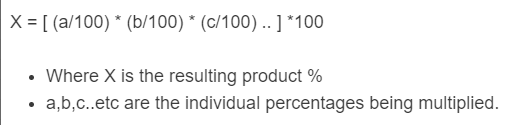
Multiplying percentages means finding a percentage of another percentage. The correct method is to convert each percentage to a decimal, multiply the decimals, and then convert the result back to a percent.
Multiplying Percentages Formula
| Symbol | Meaning |
|---|---|
| R | Final resulting percentage |
| p1, p2, ... pn | Individual percentages being multiplied |
| n | Number of percentages |
Fast Shortcut
When all inputs are already written as percentages, you can multiply the whole numbers and divide by 100 for each extra percentage after the first.
| Inputs | Shortcut | Example |
|---|---|---|
| 2 percentages | Multiply and divide by 100 | 30% × 40% = 1200 ÷ 100 = 12% |
| 3 percentages | Multiply and divide by 10,000 | 20% × 50% × 10% = 10000 ÷ 10000 = 1% |
| 4 percentages | Multiply and divide by 1,000,000 | 50% × 50% × 50% × 50% = 6250000 ÷ 1000000 = 6.25% |
Step-by-Step Instructions
- Convert each percentage to a decimal by dividing by 100.
- Multiply all decimal values together.
- Multiply the decimal product by 100 to convert back to a percentage.
Worked Examples
| Percentages | Decimal Form | Calculation | Result |
|---|---|---|---|
| 50% × 20% | 0.50 × 0.20 | 0.10 × 100 | 10% |
| 75% × 40% | 0.75 × 0.40 | 0.30 × 100 | 30% |
| 10% × 15% × 25% | 0.10 × 0.15 × 0.25 | 0.00375 × 100 | 0.375% |
| 120% × 50% | 1.20 × 0.50 | 0.60 × 100 | 60% |
Common Decimal Equivalents
| Percentage | Decimal | Percentage | Decimal |
|---|---|---|---|
| 1% | 0.01 | 25% | 0.25 |
| 5% | 0.05 | 50% | 0.50 |
| 10% | 0.10 | 100% | 1.00 |
| 15% | 0.15 | 125% | 1.25 |
When Multiplying Percentages Makes Sense
- Finding one percentage of another percentage
- Combining successive rates based on the same original total
- Calculating chained conversion or retention rates
- Working with proportions, yields, and pass-through rates
Common Mistakes
| Mistake | Correct Approach |
|---|---|
| Multiplying 20 and 50 and stopping at 1000 | For 20% × 50%, divide by 100 to get 10% |
| Adding percentages when one is applied to another | Use multiplication, not addition |
| Forgetting to convert decimals back to percent | Multiply the final decimal by 100 |
| Confusing percentage multiplication with percentage-point change | A product of percentages is different from a change from one rate to another |
Helpful Notes
- If any input is 0%, the final result is 0%.
- If all inputs are 100%, the result is 100%.
- The order does not matter; percentage multiplication is commutative.
- Results often become very small when several percentages below 100% are multiplied together.
- Percentages greater than 100% are valid and convert to decimals greater than 1.
FAQ
Can the final result be greater than 100%?
Yes. This can happen when one or more of the input percentages is greater than 100%.
Do I always need to convert to decimals?
That is the safest method. The shortcut rules above work because they are just a faster version of the same decimal conversion.
Is multiplying percentages the same as applying multiple discounts?
No. For successive discounts, you typically multiply the remaining portions, not the discount percentages themselves.
Why is the answer sometimes tiny?
Because every percentage below 100% reduces the total. Multiplying several such values together quickly shrinks the result.