Calculate usable hosts and total IPs for any CIDR prefix or subnet mask, find the prefix needed for a host count, and adjust for AWS, Azure, or GCP.
Subnet / CIDR Host Count Formula
The host count in an IPv4 subnet comes from the number of host bits left over after the network prefix. A CIDR prefix of /24 uses 24 bits for the network, which leaves 8 bits for hosts:
Usable Hosts = 2^(32 - prefix) - 2
Cloud subnets subtract more because the platform reserves addresses for its own services:
AWS / Azure: Usable = 2^(32 - prefix) - 5
 Google Cloud: Usable = 2^(32 - prefix) - 4
To count how many equal subnets fit inside a larger block:
Subnets = 2^(subnet prefix - parent prefix)
Variables:
- prefix is the CIDR prefix length, the number after the slash (0 to 32)
- 32 – prefix is the number of host bits in the address
- 2 is the standard deduction for the network address and the broadcast address
- parent prefix and subnet prefix are the block being divided and the size of each piece, such as /16 divided into /24s
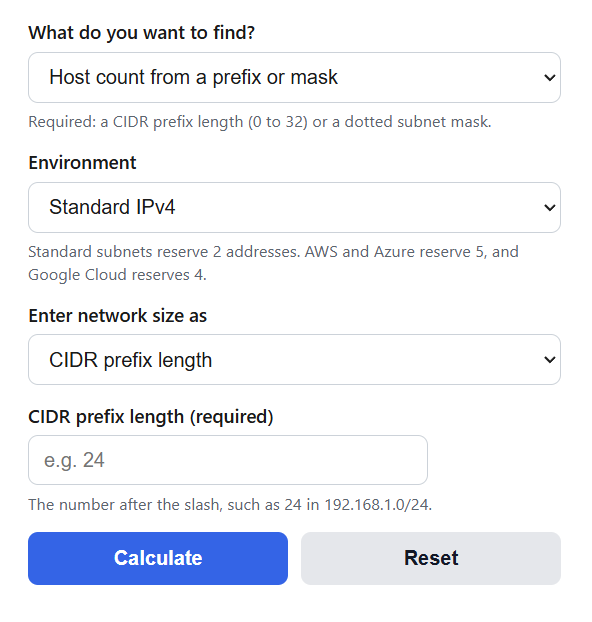
The calculator works in three modes. In host count mode you enter a CIDR prefix or pick a dotted subnet mask, and it returns the usable hosts, total addresses, subnet mask, wildcard mask, and the reserved addresses for the environment you chose. In prefix size mode you enter how many hosts need addresses, and it returns the smallest prefix whose usable count covers that requirement. In subnets mode you enter a parent prefix and a subnet prefix, and it applies the subnets formula along with the usable hosts in each piece. The environment setting switches the deduction between the standard 2 and the 5 or 4 addresses that AWS, Azure, and Google Cloud reserve. Two sizes break the standard rule: a /31 keeps both addresses usable on point-to-point links under RFC 3021, and a /32 is a single host route.
Usable Hosts by CIDR Prefix
This table covers the prefix sizes you will meet most often. Total addresses double each time the prefix drops by one.
| CIDR | Subnet mask | Total addresses | Usable hosts |
|---|---|---|---|
| /8 | 255.0.0.0 | 16,777,216 | 16,777,214 |
| /16 | 255.255.0.0 | 65,536 | 65,534 |
| /20 | 255.255.240.0 | 4,096 | 4,094 |
| /21 | 255.255.248.0 | 2,048 | 2,046 |
| /22 | 255.255.252.0 | 1,024 | 1,022 |
| /23 | 255.255.254.0 | 512 | 510 |
| /24 | 255.255.255.0 | 256 | 254 |
| /25 | 255.255.255.128 | 128 | 126 |
| /26 | 255.255.255.192 | 64 | 62 |
| /27 | 255.255.255.224 | 32 | 30 |
| /28 | 255.255.255.240 | 16 | 14 |
| /29 | 255.255.255.248 | 8 | 6 |
| /30 | 255.255.255.252 | 4 | 2 |
| /31 | 255.255.255.254 | 2 | 2 (RFC 3021) |
| /32 | 255.255.255.255 | 1 | 1 (host route) |
Usable IPs in AWS, Azure, and Google Cloud
Cloud platforms reserve extra addresses in every subnet, so the on-paper host count overstates what you can actually launch. AWS keeps 5 addresses (network, VPC router, DNS, one for future use, and broadcast), Azure keeps 5 (network, gateway, two DNS, and broadcast), and Google Cloud keeps 4. This table shows what is really assignable at common subnet sizes.
| CIDR | Standard | AWS | Azure | Google Cloud |
|---|---|---|---|---|
| /24 | 254 | 251 | 251 | 252 |
| /25 | 126 | 123 | 123 | 124 |
| /26 | 62 | 59 | 59 | 60 |
| /27 | 30 | 27 | 27 | 28 |
| /28 | 14 | 11 | 11 | 12 |
| /29 | 6 | not supported | 3 | 4 |
AWS subnets must be between /16 and /28, and the smallest supported subnet in Azure and Google Cloud is a /29. If a cloud subnet is running near its usable limit, autoscaling and managed services that inject their own interfaces can fail before you expect, so leave headroom beyond the raw count.
Example Problems
Example 1: How many usable hosts are in a /26?
A /26 leaves 32 – 26 = 6 host bits, so the subnet holds 2^6 = 64 total addresses. Subtract the network and broadcast addresses:
Usable Hosts = 64 – 2 = 62.
Example 2: What size AWS subnet do you need for 100 instances?
In AWS the deduction is 5, so you need 2^h – 5 to reach at least 100. Seven host bits gives 128 – 5 = 123, which covers the requirement, while six bits gives only 59. Seven host bits means a prefix of 32 – 7 = /25.
A /25 (255.255.255.128) provides 123 usable AWS addresses, leaving 23 spare after the 100 instances.
Frequently Asked Questions
Why do you subtract 2 from the host count?
The all-zeros host address identifies the subnet itself and appears in routing tables, and the all-ones host address is the broadcast address that reaches every device on the subnet. Neither can be assigned to a device, so a subnet with 2^h total addresses offers 2^h – 2 usable ones. The exceptions are /31 links, where RFC 3021 lets both addresses be used because a two-node link has no need for broadcast, and /32, which is a route to a single host.
Is the number of hosts the same as the number of IP addresses?
No. Total addresses count every value in the range, including the network and broadcast addresses and any platform reservations. Usable hosts are what you can actually assign. The gap is 2 addresses on a standard network, 4 on Google Cloud, and 5 on AWS and Azure, which matters most in small subnets: a /28 has 16 addresses but only 11 usable in AWS.
How does host counting work for IPv6?
An IPv6 prefix follows the same idea with 128 bits instead of 32, so a prefix leaves 2^(128 – prefix) addresses. There is no broadcast address in IPv6, so nothing is subtracted. The standard LAN size is a /64, which holds 2^64 addresses, about 18 quintillion, so IPv6 subnets are sized by structure and routing policy rather than by host count.