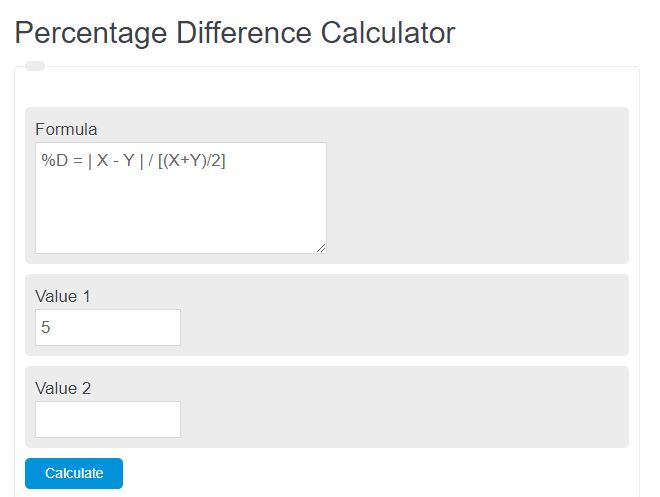
Calculate symmetric percentage difference, absolute gap, average, ratio, directional changes, or reverse-solve the two positive values matching a target percentage difference.
- All Math and Numbers Calculators
- Average of Percentages Calculator
- Reverse Percentage Calculator
- Percent Deviation Calculator
- RPD (Relative Percent Difference) Calculator
Percentage Difference Formula and How to Use It
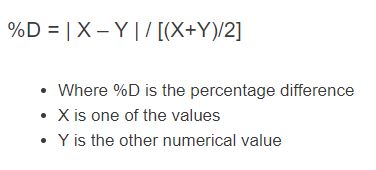
The percentage difference measures how far apart two values are relative to their average. It is best used when both values are being compared on equal footing, such as two measurements, two prices, two test results, or two dimensions. Because the calculation uses the average of the two values, the result is the same even if the inputs are reversed.
Percentage Difference Formula
- A = first value
- B = second value
- The numerator measures the absolute gap between the values.
- The denominator scales that gap by the average of the values.
How to Calculate Percentage Difference
- Find the absolute difference between the two values.
- Find the average of the two values.
- Divide the difference by the average.
- Multiply by 100 to convert the result into a percentage.
Example
If the two values are 80 and 100, first find the difference, then divide by their average.
This means the two values differ by 22.22% relative to their midpoint.
What the Result Means
- 0% means the values are exactly the same.
- A small percentage means the values are close together.
- A large percentage means the values are far apart compared with their average.
- More than 100% is possible when the difference is larger than the average.
Percentage Difference vs. Percentage Change
These two ideas are often confused, but they answer different questions.
| Measure | Best Use | Formula |
|---|---|---|
| Percentage Difference | Compare two values without treating either one as the baseline | (|A - B|) / ((A + B) / (2)) × 100 |
| Percentage Change | Measure increase or decrease from an original value to a new value | (New - Original) / (Original) × 100 |
| Percent Error | Compare a measured value to an accepted or true value | (|Measured - Accepted|) / (|Accepted|) × 100 |
When to Use This Calculator
- Comparing two lab measurements
- Checking the spread between two prices
- Comparing production output from two batches
- Reviewing differences between survey results
- Measuring how close two dimensions or estimates are
Important Notes
- Use the same units for both inputs before calculating.
- The calculation is symmetric, so switching the inputs does not change the answer.
- If the average of the two values is zero, the percentage difference is undefined.
- Use percentage change instead when one number is clearly the starting value and the other is the ending value.
Quick FAQ
Can percentage difference be negative?
No. The formula uses an absolute difference, so the result is always zero or positive.
Can percentage difference be greater than 100%?
Yes. If the gap between the two values is larger than their average, the result will exceed 100%.
Why does the formula use the average?
Using the average creates a balanced comparison so neither value is treated as the single reference point.
Is percentage difference the same as percent increase?
No. Percent increase and percent decrease require a starting value, while percentage difference compares two values equally.