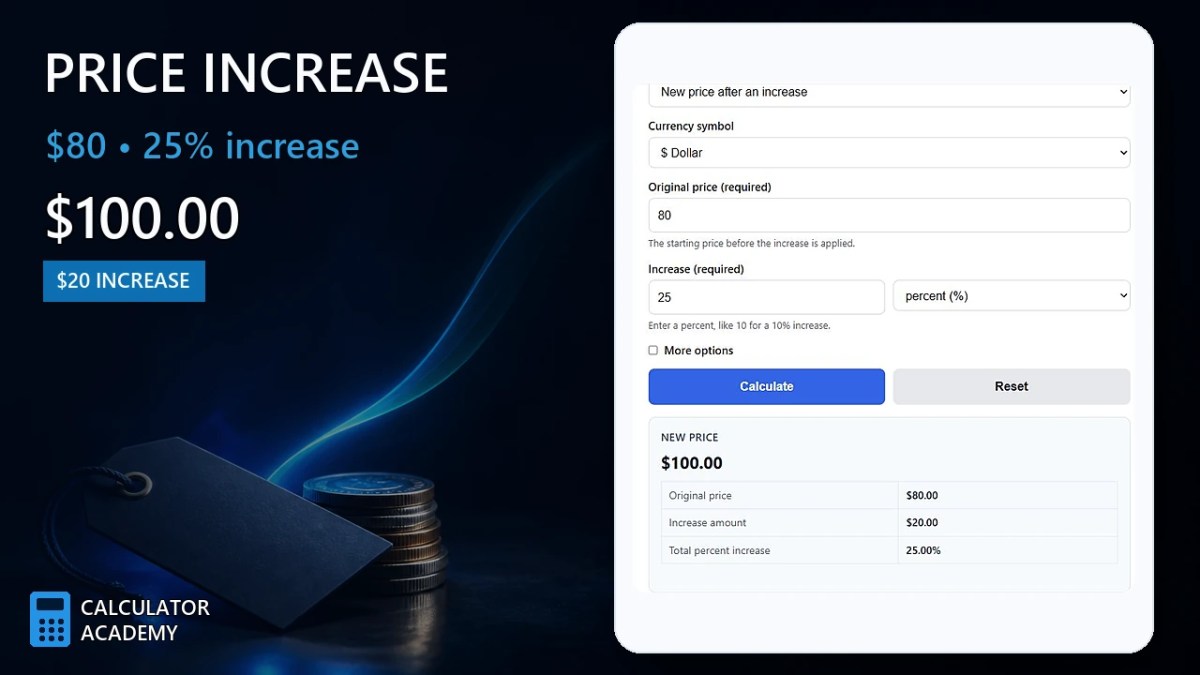
Calculate price increase by finding original price, percentage increase, or new price when any two values are known, with step-by-step breakdown.
- All Business Calculators
- All Price Calculators
- Percent Decrease Calculator
- Original Price Calculator
- Optimal Price Calculator (Best Sell Price)
- Price Per kg Calculator
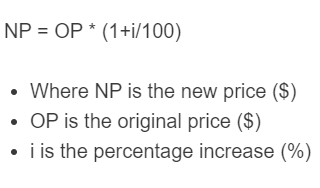
Price Increase Formula
A price increase tells you the new price after raising an original price by a given percentage. This calculator is most useful when you know the starting price and the percent increase and want the updated total immediately.
Where:
- NP
- New price after the increase
- OP
- Original price before the increase
- i
- Percentage increase
If you want the increase amount only rather than the final price, use:
Where PI is the dollar amount added to the original price. The new price is then:
How to Calculate a Price Increase
- Identify the original price.
- Convert the percentage increase into a decimal by dividing by 100.
- Multiply the original price by that decimal to find the increase amount.
- Add the increase amount to the original price to get the new price.
You can also skip the separate increase step and multiply the original price by a single price multiplier.
- 5% increase → multiply by 1.05
- 10% increase → multiply by 1.10
- 15% increase → multiply by 1.15
- 20% increase → multiply by 1.20
- 25% increase → multiply by 1.25
- 50% increase → multiply by 1.50
Example
If an item costs $80 and the price rises by 15%, the increase amount is $12 and the new price is $92.
The same result can be found directly with the multiplier method:
Reverse Price Increase Calculations
In many situations, you may know the old and new prices and want to find the percentage increase, or you may know the new price and want to recover the original price before the increase.
To find the percentage increase:
To find the original price from a known new price and increase percentage:
This reverse formula is especially helpful when a final sale price, subscription renewal price, or updated service charge is known but the prior amount is not.
Successive Price Increases
If a price goes up more than once, do not add the percentages unless they were all applied to the same original price. Repeated increases are usually compounded, meaning each increase applies to the current price at that time.
For example, a 20% increase followed by a 10% increase is not the same as a single 30% increase. The total multiplier is 1.20 × 1.10 = 1.32, which means the final price is 32% above the original.
Price Increase vs. Markup vs. Margin
These terms are often confused, but they are not identical:
- Price increase compares a new price to a previous price.
- Markup usually compares selling price to cost.
- Margin measures profit as a percentage of the selling price.
If you are updating a product price from $100 to $110, that is a 10% price increase. It does not automatically mean the markup or profit margin is 10%.
Common Uses for a Price Increase Calculator
- Updating retail product prices after cost changes
- Adjusting service fees and hourly rates
- Estimating rent, dues, or subscription renewals
- Planning salary or wage increases
- Comparing supplier quotes before and after a percentage change
- Forecasting future budgets when known increases are expected
Common Mistakes
- Adding the percentage as a flat number. A 10% increase does not mean adding 10 dollars unless the original price is $100.
- Using the wrong base. The percentage increase should be based on the original price, not the new price.
- Ignoring compounding. Multiple increases should usually be applied one after another.
- Confusing increase amount with new price. The increase amount is only the added portion; the new price includes both the original amount and the increase.
- Mixing percentages and decimals. 8% should be entered as 8 when the calculator expects a percent, not 0.08.
Quick Reference Table
| Original Price | Increase % | Increase Amount | New Price |
|---|---|---|---|
| $50 | 10% | $5 | $55 |
| $120 | 8% | $9.60 | $129.60 |
| $200 | 25% | $50 | $250 |
| $1,000 | 3% | $30 | $1,030 |
Frequently Asked Questions
What does a 100% price increase mean?
A 100% increase means the price doubles. If the original price is $40, the new price becomes $80.
How do I calculate only the dollar increase?
Multiply the original price by the percentage increase divided by 100. That gives the amount added, not the final price.
Can the result include cents?
Yes. In most real-world pricing situations, the result should be rounded to the nearest cent unless a different pricing policy is being used.
How do I undo a price increase?
Divide the new price by the increase multiplier. For example, if a price after a 15% increase is known, divide by 1.15 to recover the original price.
Why is a 20% increase followed by a 20% decrease not equal to the original price?
Because the percentages are applied to different bases. Once the price changes, the next percentage uses the new amount, not the original one.
Practical Tip
When reviewing a quoted increase, separate the change into two parts: the added dollar amount and the final price. Seeing both values makes it easier to compare alternatives, explain changes to customers, and check whether the increase fits your budget or pricing strategy.