Calculate ordinary-annuity PVIFA, its implied rate or periods, and present value or payment for ordinary or due annuities. Rates may be entered as percent or decimal; periods are a count, not a percentage.
Related Calculators
- PV Of Lease Calculator
- Lease Discount Rate Calculator
- Preferred Return Calculator
- Factor Rate Calculator
- All Business Calculators
PVIFA Formula
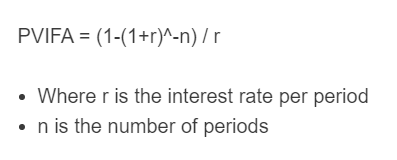
The formula for calculating the present value interest factor of an annuity is as follows:
- Where r is the interest rate per period
- n is the number of periods
To calculate PVIFA, raise 1 plus the rate per period to the negative number of periods, subtract this value from 1, then divide by the rate per period. (When r = 0, PVIFA = n.)
PVIFA Definition
What is PVIFA? PVIFA is defined as the present value interest factor of an annuity. This factor is used to compute the present value of an ordinary annuity (a level-payment stream) by multiplying a recurring payment by the factor.
What does PVIFA mean in economics? PVIFA is a term used in the fields of economics, finance, and accounting. PVIFA stands for the present value interest factor of an annuity.
What is PVIFA used for? PVIFA is used to compare a lump-sum payment today to a series of equal annuity payments in the future (by converting the future payment stream to a present value). This factor can only be used when the payments are constant and known and when the discount rate per period is constant.
How to calculate PVIFA?
- First, determine the interest (discount) rate per period. The PVIFA formula assumes a constant rate per period; if rates vary by period, discount each payment using its own period’s rate (or use an equivalent constant rate) rather than a simple average rate. For this example, we will assume a standard yearly return of 8%.
- Next, determine the number of periods. For this problem, the time period being analyzed is 5 years long, which is equal to 5 periods.
- Finally, calculate the PVIFA. Using the formula above, the PVIFA is determined to be (1-(1+.08)-5) / .08 ≈ 3.9927
PVIFA Table
A PVIFA table can show the ordinary-annuity factor across chosen period counts and effective periodic rates. The calculator above evaluates a selected rate and period count directly.
How to create a PVIFA table in Excel? To build a table in Excel with decimal rates in row 2 starting at B2 and period counts in column A starting at A3, enter =IF(B$2=0,$A3,(1-(1+B$2)^(-$A3))/B$2) in B3. Copy right and down. Ordinary payments occur at period ends; multiply the factor by (1+r) for an annuity due. Use whole period counts for literal payment schedules; fractional inverse results evaluate the algebraic formula.