Calculate screen PPI from resolution and diagonal size, or find print pixel dimensions from paper size and DPI in inches, cm, or mm.
- All Unit Converters
- Angular Resolution Calculator
- Aperture Area Calculator
- Resolution Calculator
- Pixel To Percentage Calculator
DPI Formula
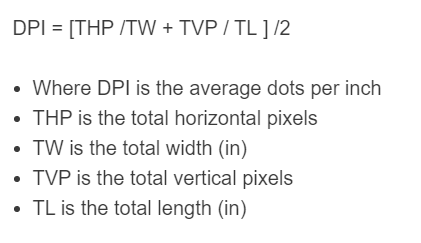
For screens, pixel density is usually expressed as PPI (pixels per inch). Many people casually call this “screen DPI,” but DPI is a printing term (“dots per inch”). The standard way to compute screen pixel density is to divide the pixel diagonal by the physical diagonal:
- Where PPI is pixels per inch (screen pixel density)
- Hpx is the total horizontal pixels
- Vpx is the total vertical pixels
- Din is the diagonal screen size in inches
To calculate PPI, find the diagonal pixels using the Pythagorean theorem (square root of horizontal pixels squared plus vertical pixels squared), then divide by the screen’s diagonal size in inches.
DPI Definition
What does DPI stand for? DPI stands for dots per inch. It is a measure of how many individual dots a printer can place in one inch (a printing/marking density).
Are DPI and PPI the same? Not exactly. PPI (pixels per inch) describes the pixel density of a display, while DPI describes dot density in printing. In casual usage, people often say “DPI” when they mean “PPI” for screens, but a “dot” is a printed mark (not an inch), and printers may use multiple dots to reproduce one image pixel.
How to calculate DPI?
The following example problem uses the formula above to determine the pixel density (PPI) of a computer screen.
- First, determine the total number of horizontal pixels. In this example, the screen is 1920 pixels wide.
- Next, determine the total number of vertical pixels. In this example, the screen is 1080 pixels tall.
- Next, determine the diagonal screen size. In this example, the screen is 15.6 inches diagonally.
- Finally, calculate PPI: √(1920² + 1080²) / 15.6 ≈ 141.2 PPI.
Additional Information
Can DPI be increased? For a screen, the physical pixel density (PPI) is fixed by the panel’s pixel grid and physical size, so it cannot be increased by a setting. Device settings can change scaling (UI size) or the rendered resolution, but they do not add physical pixels to the display.
Does DPI affect file size? Changing an image’s DPI/PPI metadata alone typically does not change file size. File size mainly depends on pixel dimensions (e.g., 4000×3000) and compression/encoding settings. DPI/PPI metadata primarily changes the intended print size unless the image is resampled (pixel dimensions changed).
Does DPI matter for digital art? For viewing on screens, what matters most is the artwork’s pixel dimensions and the viewer’s screen PPI (which affects how large and sharp those pixels appear at a given physical size). DPI/PPI metadata is mainly relevant when you print the artwork (it helps determine the printed size for a given pixel count).