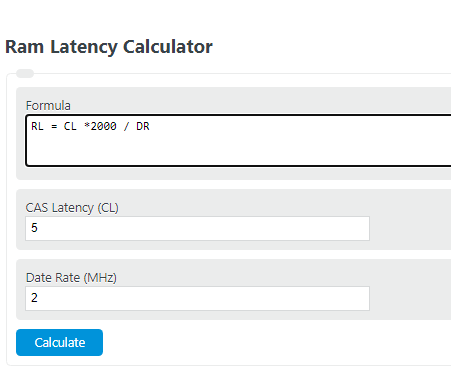
Calculate RAM latency, CAS latency, or data rate by entering any two values and finding the missing DDR memory timing in nanoseconds or MHz.
- All Miscellaneous Calculators
- RAM Usage Calculator
- Memory Size Calculator
- Processor Speed Calculator
- Clock Cycles Per Instruction Calculator
- Data Size Calculator
- Bandwidth Delay Product Calculator
How to Use the RAM Latency Calculator
The RAM latency calculator converts a memory kit’s advertised CAS latency (CL) and data rate into a real delay measurement in nanoseconds (ns). This is useful because comparing RAM by CL alone can be misleading. A kit with a higher CL can still deliver similar or better real latency if it also runs at a higher data rate.
In practical terms, this calculator estimates first-access latency for DDR memory. Lower latency means the memory begins responding to a request more quickly, while higher data rates improve overall bandwidth. The best RAM choice usually balances both.
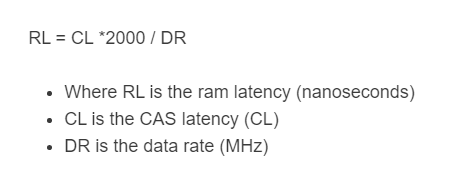
RAM Latency Formula
- RL = RAM latency in nanoseconds
- CL = CAS latency
- DR = data rate of the memory kit
Many RAM listings informally label the speed as MHz, but for DDR memory the advertised number is typically the effective transfer rate used for this comparison. For calculator use, enter the same speed value shown in the memory kit’s specifications.
How to Calculate RAM Latency
- Enter the memory kit’s CAS latency.
- Enter the kit’s rated data rate.
- Calculate the result to find the approximate latency in nanoseconds.
- Use the result to compare different RAM kits on a true timing basis instead of relying on CL alone.
Rearranged Forms of the Formula
If you know the latency and one of the other values, you can solve for the missing variable.
Example Comparison
Converting multiple RAM kits to nanoseconds makes it much easier to compare them fairly.
| Memory Kit | CAS Latency | Data Rate | Approx. True Latency |
|---|---|---|---|
| DDR4-3200 CL16 | 16 | 3200 | 10.00 ns |
| DDR4-3600 CL18 | 18 | 3600 | 10.00 ns |
| DDR5-5600 CL36 | 36 | 5600 | 12.86 ns |
| DDR5-6000 CL30 | 30 | 6000 | 10.00 ns |
Notice that a higher CL number does not automatically mean slower real performance. For example, DDR4-3200 CL16 and DDR4-3600 CL18 both come out to about 10 ns of CAS latency.
Example Calculation
If a memory kit is rated at CL16 and 3200 data rate, its approximate RAM latency is:
What the Result Means
- Lower nanoseconds: faster initial response from RAM.
- Higher data rate: more memory bandwidth for moving data.
- Lower CL: fewer memory cycles before data begins to transfer.
- Best overall choice: a kit with a strong balance of bandwidth, latency, stability, and capacity.
Why CL Alone Is Not Enough
CAS latency is only part of the picture. A lower CL value sounds better, but memory speed changes how long each cycle actually takes. That is why the nanosecond result is more useful when comparing kits across different speeds.
For instance, a CL30 kit at a very high data rate may respond just as quickly as, or quicker than, a CL16 kit at a lower data rate. The calculator turns both values into one common measurement so you can compare them directly.
Other Factors That Affect Memory Performance
This calculator focuses on CAS or first-word latency, but real-world RAM performance also depends on several other variables:
- Capacity: too little RAM can slow a system far more than minor timing differences.
- Channel configuration: dual-channel or multi-channel memory increases throughput.
- Secondary timings: values such as tRCD, tRP, and tRAS also affect access behavior.
- CPU and motherboard support: memory controller quality and platform limits matter.
- Enabled profile: RAM often needs the correct profile enabled to reach its rated settings.
Common RAM Comparison Mistakes
- Comparing CL numbers only without accounting for speed.
- Assuming the highest advertised frequency is always the fastest real choice.
- Ignoring capacity requirements for gaming, productivity, or content creation.
- Mixing memory kits and expecting all sticks to run at their rated timings.
- Comparing kits tested on different platforms without considering motherboard and CPU limitations.
When Lower RAM Latency Matters Most
Lower RAM latency is generally more noticeable in workloads that are sensitive to fast memory response, such as gaming, competitive esports titles, simulation workloads, and some lightly threaded applications. In heavier productivity tasks, bandwidth and capacity may matter just as much or more.
That means a low-latency kit is valuable, but it should be judged alongside total memory size, platform compatibility, and the rated speed you can realistically run on your system.
RAM Latency FAQ
Is lower RAM latency better?
Yes. Lower latency means the memory responds more quickly once data is requested.
Is higher speed always better than lower latency?
Not always. Higher speed improves bandwidth, while lower latency reduces delay. The best performance usually comes from a good balance of both.
Can two kits with different specs have the same latency?
Yes. A lower-speed kit with tighter timings and a higher-speed kit with looser timings can produce nearly identical nanosecond latency.
Does this calculator measure total system performance?
No. It estimates RAM CAS latency only. Real performance also depends on CPU architecture, motherboard support, workload type, and other memory timings.
Can I use this calculator for DDR4 and DDR5?
Yes. It is useful for either generation as long as you enter the kit’s advertised CAS latency and rated data rate.